How to organize a student to-do list without duplicating your timetable
Updated: 2026-10-15
Separate events from actions
A class at 9:00 and an exam on Friday belong on a schedule because they happen at a fixed time. “Read chapter 4” and “draft the lab conclusion” are actions; they belong in a to-do list. Mixing both types into one long calendar makes the important next step harder to see.
For assignments, keep the official due date in the planner and create one or more tasks for the work. This gives you a reliable deadline without pretending the whole assignment will be completed in one calendar block.
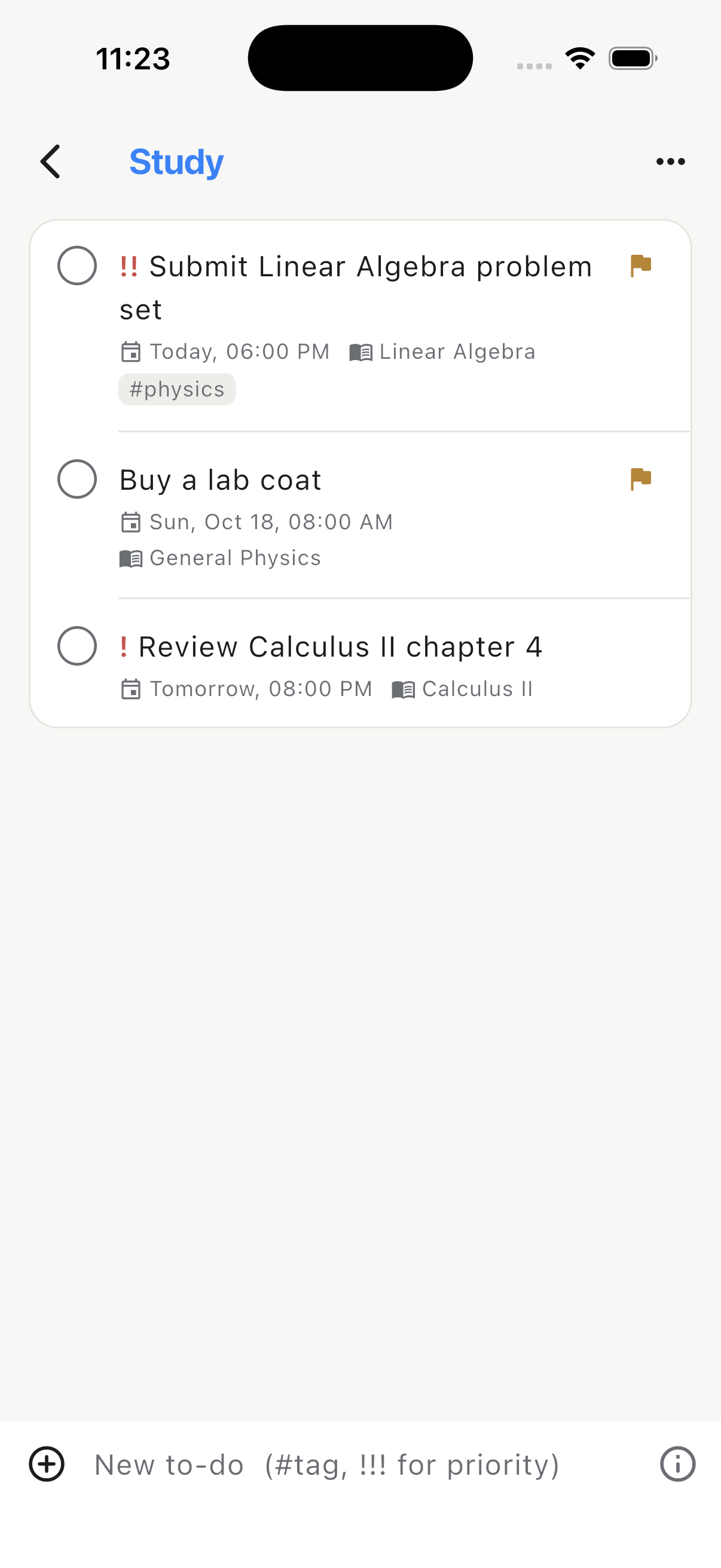
Create a small set of useful lists
Start with broad contexts such as Study, Personal and Admin. Add a separate list for a major project only when it contains enough work to need its own view. Too many lists create another filing system to maintain; too few make unrelated actions compete for attention.
Use subject links for academic work. A task such as “Review matrix exercises” becomes easier to filter when it is connected to Linear Algebra, while a personal task can remain independent of the timetable.
Write the next visible action
“Physics project” is a topic, not an action. Replace it with something you can start: “Choose the experiment,” “Ask Minh for the measurements” or “Draft the results chart.” Concrete verbs reduce the effort needed to begin and make completion unambiguous.
Use subtasks for work with a clear sequence
Break an assignment into subtasks when the pieces are known and each one can be completed separately. A report might contain research, outline, first draft, figures, references and final review. Keep the parent task tied to the deadline, then check off the smaller steps as they are finished.
Avoid turning every task into a checklist. If the action takes only a few minutes, the overhead of creating subtasks may exceed the value.
Add reminders and repeats selectively
Use a reminder when missing the task at that moment has a real cost: submitting work, bringing equipment or preparing before a class. Too many notifications train you to ignore all of them. Recurring tasks are best for genuine routines such as a weekly attendance review or backing up at the end of the month.
Review the list beside the week
Open the weekly timetable before choosing due dates. A task that looks reasonable in isolation may land on a day already filled with classes. Move flexible study actions into open blocks and preserve buffer time before fixed deadlines.
- Clear completed and obsolete tasks.
- Check upcoming exams and assignment deadlines.
- Choose the next action for each active subject.
- Move only a realistic number into Today.
- Review overdue items instead of repeatedly postponing them.
Keep planning close to the class context
Classly places To-do beside attendance, Today, Week, Calendar and Planner. Lists support reminders, repeats, subtasks and tags, while subject links preserve academic context. The bottom bar is customizable, so To-do or another utility can stay one tap away without crowding the main workflow.

More attendance tools
Common questions
Should an assignment be a deadline or a to-do?
Keep the submission time as a fixed deadline and create separate to-dos for the work needed to finish it.
How many tasks should a student plan each day?
Keep the visible list small and realistic. Choose a few next actions, then leave later work in its project or subject list.